SCAM AWARENESS EDUCATION SERIES
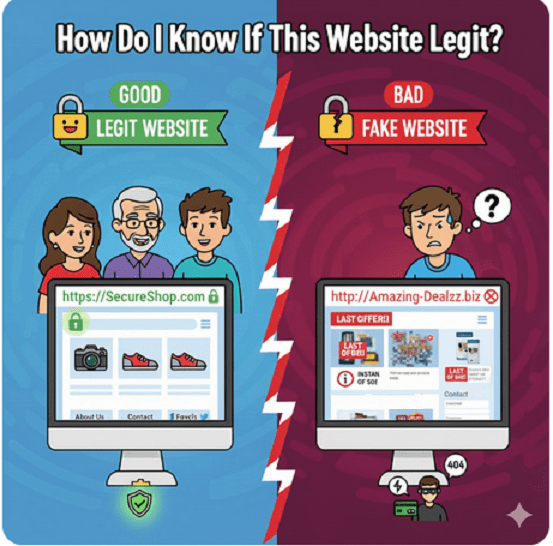
How Do I Know If This Website Legit?
The line between a genuine business and a sophisticated scam can be incredibly thin. Knowing how to spot a “fake” can save you from identity theft, financial loss, and malware.
Here is a checklist to help you determine if a website is the real deal.
1. Inspect the URL and Address Bar
The first line of defense is the website address (URL) itself.
Check for Typosquatting: Scammers often use URLs that look nearly identical to famous brands (e.g.,
amaz0n.comorwellsfargoo.com). Look for extra letters, swapped numbers, or strange extensions.The “S” in HTTPS: Ensure the URL starts with
https://rather than justhttp://. The “S” stands for secure, meaning the data sent between you and the site is encrypted.The Padlock Icon: Click the padlock icon in your browser’s address bar. It allows you to view the site’s security certificate. If the browser says “Connection is not secure,” leave immediately.
2. Evaluate the Design and Content
Professional companies invest heavily in their digital presence. Scammers usually take shortcuts.
Poor Grammar and Spelling: Legitimate businesses hire editors. If you see glaring typos, odd phrasing, or broken English, it’s a major red flag.
Low-Resolution Images: If the logos are blurry or the product photos look like they were “stolen” from a Google search, be wary.
Broken Links: Click around the footer. If the “About Us” or “Contact” links don’t work or just refresh the homepage, the site is likely a hollow shell.
3. Look for Contact Information
A “Contact Us” page that only features a generic form is suspicious. A legitimate business should provide:
A physical office address (verify this on Google Maps).
A functional phone number.
A professional email address (e.g.,
support@brand.com, notbrand-support@gmail.com).
4. Check the “Whois” Data
You can see who actually owns a domain by using a Whois Lookup tool.
Domain Age: If a site claims to have been in business for 10 years but the domain was registered only three weeks ago, it is likely a scam.
Registry Info: If the owner’s information is completely hidden or listed in a high-risk country unrelated to the brand, proceed with caution.
5. Verify Through Third-Party Reviews
Don’t trust the testimonials on the website itself—they can be easily fabricated. Instead, look at:
Trustpilot or Better Business Bureau (BBB): Search for the company name to see real customer experiences.
Google Reviews: Look for a “Google Business Profile” for local or established entities.
The “Scam” Search: Type the website name followed by the word “scam” or “review” into your search engine.
Quick Comparison Table: Legit vs. Fake
| Feature | Legitimate Website | Suspect Website |
| URL | Correct spelling, uses .com, .org, or .net | Misspellings, odd extensions (like .biz-deals) |
| Payment | Secure gateways (Credit Card, PayPal) | Requests Wire Transfers, Crypto, or Gift Cards |
| Contact | Multiple ways to reach a human | Only a generic contact form |
| Ads | Minimal or relevant | Aggressive pop-ups and “low-stock” timers |
Trust Your Instinct
If a deal looks too good to be true—like a brand-new PlayStation for $50—it almost certainly is. When in doubt, use a virtual credit card or a service like PayPal that offers buyer protection, rather than entering your primary debit card info.
Remember, awareness is your strongest defense.
Contact us if you’d like more information on how cyber intelligence can help you locate scammers.
Please share this guide with friends and colleagues.
Stay up to date on the latest scam company alerts.
Advanced cyber tracking and profiling technology can identify where they are hiding.
Get in touch today and receive a free phone consultation.

GlobalMarkets AC Clone Website globalmarketsac.com

Seyrkule Luxembourg unauthorized trading website
ANF Luxembourg S.A. Clone Website

Lucrumia Group lucrumiaofficial.co Unauthorized Trading App
Freetradeeuropa.com et al Illegal Trading Websites
Forum One Imposter Clone Website forumone.eu.com

Zureon Global zureonglobal.com Unauthorized Trading
Logan Investment SA Luxembourg loganinvestment.lu Clone Website
Clairmontfils clairmontfils.com Unauthorized Website
